
Blob Columns
Lance can store large binary objects (images, videos, audio, model artifacts) in blob columns, where they are treated like any other column payload in the dataset. Blob columns support both planned full-payload reads and lazy file-like access.
Choosing between read_blobs and take_blobs
- For data loaders and batch processing that need complete byte payloads, use
read_blobs. - Use
take_blobswhen you need aBlobFilehandle for streaming, seeking, or partial reads.
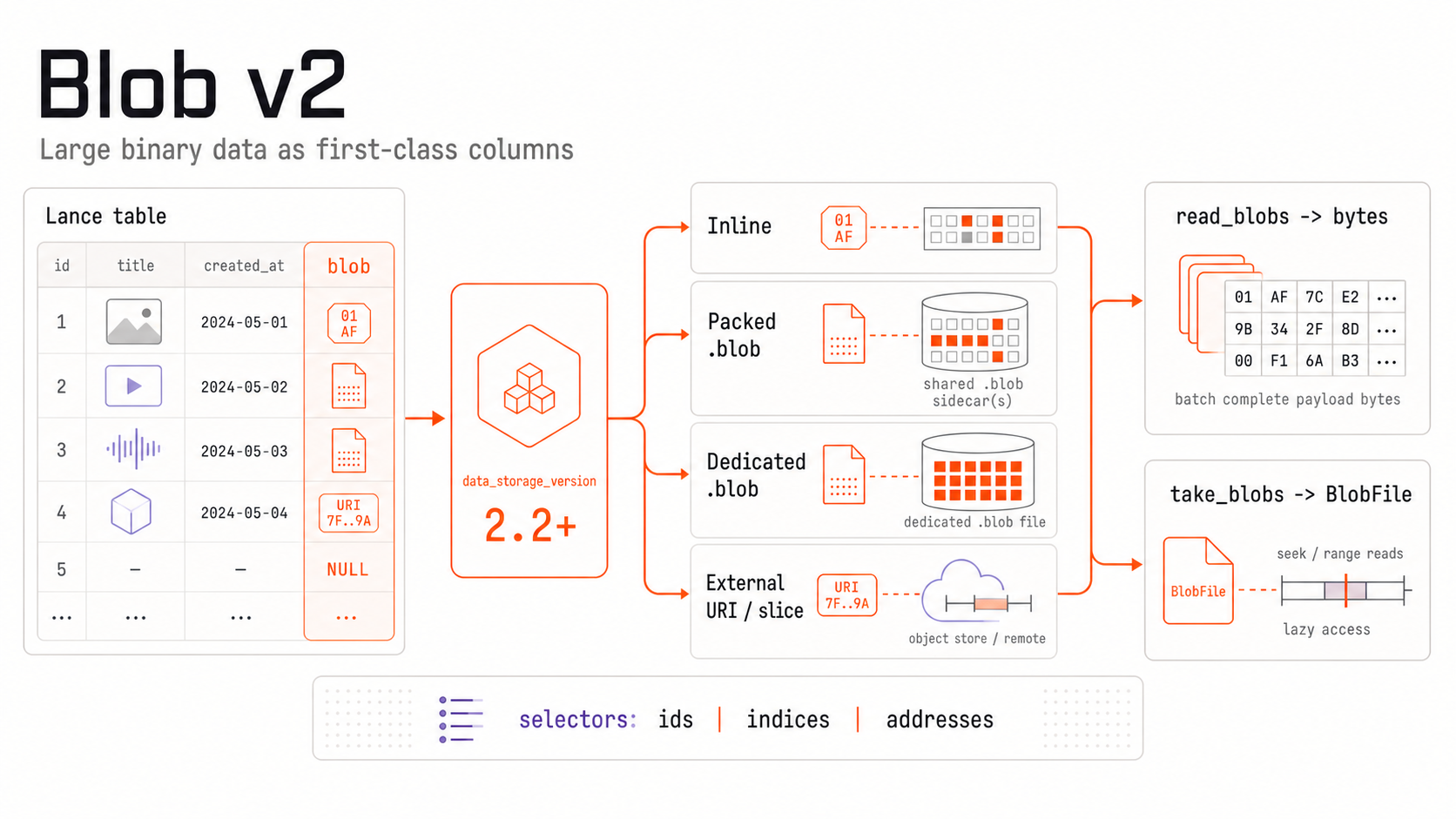
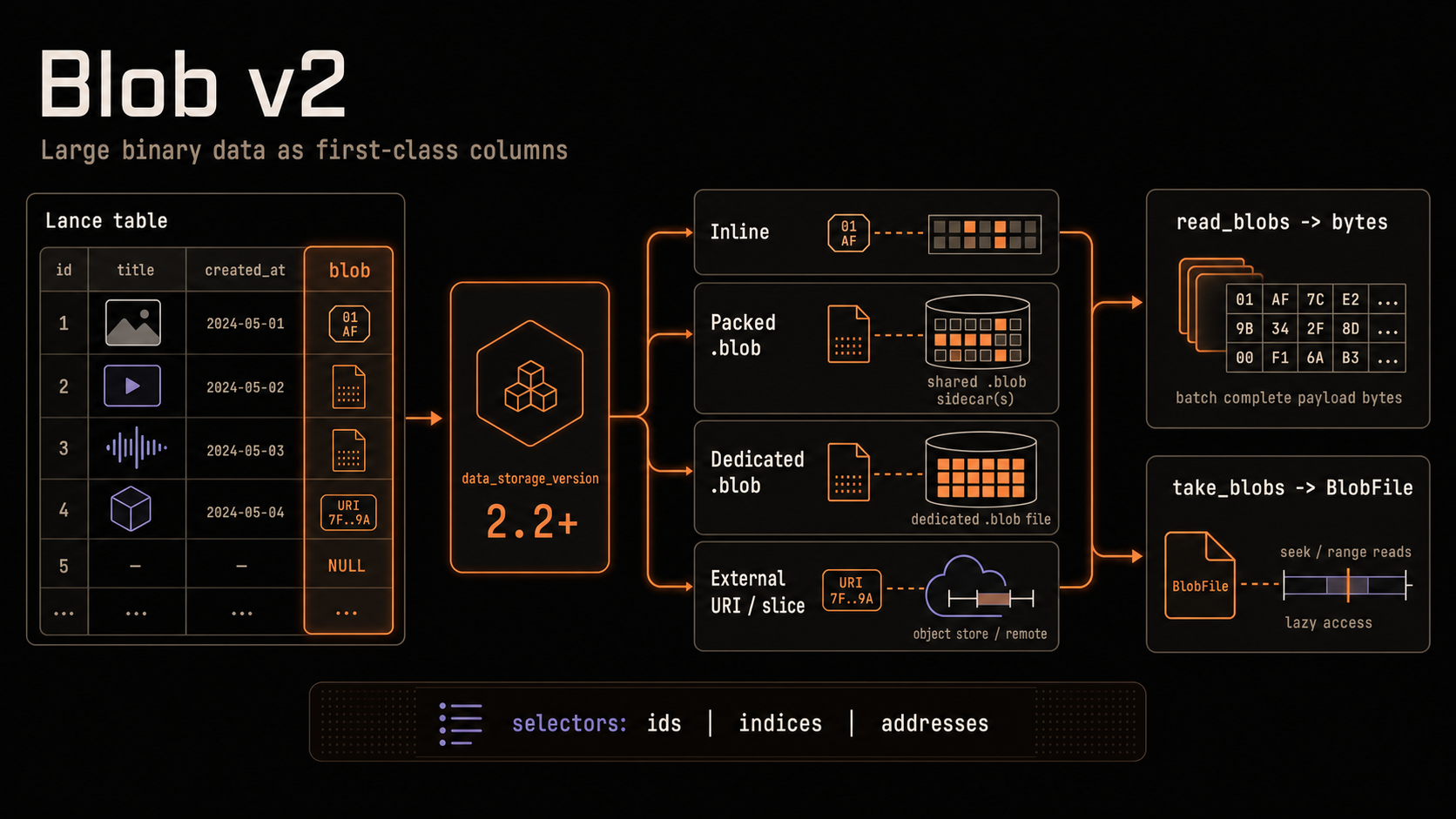
If you're unsure about whether you need a blob column in the first place (and why it's useful), read the "when to use blob column vs. inline binary" section below.
Quick Start: Blob v2
This page focuses on blob workflows in Python and uses Lance file format terminology.
data_storage_versionmeans the Lance file format version of a dataset.- A dataset has a default file format version. Append and compaction can select
another exact
2.xversion without rewriting existing files or changing that default. - File format
0.1cannot be mixed with the2.xfamily.
import lance
import pyarrow as pa
from lance import blob_array, blob_field

schema = pa.schema([
    pa.field("id", pa.int64()),
    blob_field("blob"),
])

table = pa.table(
    {
        "id": [1],
        "blob": blob_array([b"hello blob v2"]),
    },
    schema=schema,
)

ds = lance.write_dataset(table, "./blobs_v22.lance", data_storage_version="2.2")

_row_address, payload = ds.read_blobs("blob", indices=[0])[0]
assert payload == b"hello blob v2"
Version Compatibility
Blob support is tied to the dataset's file format version. Earlier file format versions
(< 2.2) stored blobs using the lance-encoding:blob metadata field, while Blob
v2 introduces a new storage layout that requires file format >= 2.2.
The target file version selects the physical Blob encoding. For >= 2.2,
dataset writers also accept legacy blob-marked binary inputs and convert them
to Blob v2 before encoding. Older files keep their original encoding.
Dataset data_storage_version |
Legacy blob metadata (lance-encoding:blob) |
Blob v2 (lance.blob.v2) |
|---|---|---|
0.1, 2.0, 2.1 |
Supported for write/read | Not supported |
2.2+ |
Accepted as input; written as Blob v2 | Supported for write/read (recommended) |
Mixing legacy Blob and Blob v2 files
Append with data_storage_version="2.2" to start writing Blob v2 into an
existing 2.0 or 2.1 dataset. Both legacy blob-marked binary inputs and
blob_field / blob_array inputs are accepted. No separate upgrade operation
or historical-payload rewrite is required.
When the first Blob v2 file for a legacy column is committed, the snapshot uses
the Blob v2 logical schema for that column. Descriptor scans return the v2
kind, position, size, blob_id, blob_uri struct across all fragments, including
selections containing only old files. Old payloads appear as Inline descriptors
pointing into their original data files. take_blobs, read_blobs, and
blob_handling="all_binary" continue to expose the same payloads, nulls, and
empty values. Historical snapshots retain their previous schema.
Descriptor consumers that access fields by position or compare exact Arrow
schemas must account for the extended structure. Interpret position together
with kind and the object reference. See the schema-transition discussion.
The dataset's default file version remains unchanged. Select 2.2 or newer
explicitly when writing Blob v2 structs or compacting the mixed column into
Blob v2 files. Compaction rewrites the selected fragments; it is not required
to enable new Blob v2 writes.
Blob v2: Write Patterns
Use blob_field and blob_array to build blob v2 columns.
Logical Arrow schema
A blob v2 field is tagged with ARROW:extension:name = "lance.blob.v2". Writers
accept these logical struct shapes:
| Shape | Children | Use |
|---|---|---|
| Minimal | data: LargeBinary?, uri: Utf8? |
Inline bytes or a complete external object |
| Complete | Minimal fields plus position: UInt64?, size: UInt64? |
An optional byte range within an external object |
Every non-null row must set exactly one of data and uri. For the complete
shape, position and size must either both be set or both be null, a range
requires uri, and an explicit range must have size > 0. Use inline b"" for
an empty blob; a URI without range fields still represents the complete external
object, including an empty object. Python's blob_field and BlobType use the
complete shape. Lance preserves an accepted logical shape, including child
fields, nullability, and metadata, across create, append, and merge-insert
writes; descriptor scans still return the compact stored descriptor shape.
import lance
import pyarrow as pa
from lance import Blob, blob_array, blob_field

schema = pa.schema([
    pa.field("id", pa.int64()),
    blob_field("blob", nullable=True),
])

# A single column can mix:
# - inline bytes
# - external URI
# - external URI slice (position + size)
# - null
rows = pa.table(
    {
        "id": [1, 2, 3, 4],
        "blob": blob_array([
            b"inline-bytes",
            "s3://bucket/path/video.mp4",
            Blob.from_uri("s3://bucket/archive.tar", position=4096, size=8192),
            None,
        ]),
    },
    schema=schema,
)

ds = lance.write_dataset(
    rows,
    "./blobs_v22.lance",
    data_storage_version="2.2",
)
Note:
- By default, external blob URIs must map to a registered non-dataset-root base path.
- If you need to reference external objects outside those bases, set
allow_external_blob_outside_bases=Truewhen writing. - Blob v2 storage layout thresholds can be configured per column with
blob_field(..., inline_size_threshold=..., dedicated_size_threshold=...). The inline threshold controls when values move from the data file to packed.blobsidecar storage. The dedicated threshold controls when values move from packed sidecar storage to a dedicated.blobfile. The dedicated threshold is checked first. For existing columns, these thresholds are stored in the dataset schema; appends that explicitly provide different threshold metadata for the same column are rejected. blob_pack_file_size_thresholdis a write option for rolling packed.blobsidecar files. It does not control inline-vs-packed placement.- Blob v2 fields can be nested inside structs and variable-length lists. Blob-aware
scans preserve the surrounding nested layout; use
blob_handling="all_binary"to materialize nested blob payloads as bytes.
Example: packed external blobs (single container file)
import io
import tarfile
from pathlib import Path
import lance
import pyarrow as pa
from lance import Blob, blob_array, blob_field

# Build a tar file with three payloads
payloads = {
    "a.bin": b"alpha",
    "b.bin": b"bravo",
    "c.bin": b"charlie",
}

with tarfile.open("container.tar", "w") as tf:
    for name, data in payloads.items():
        info = tarfile.TarInfo(name)
        info.size = len(data)
        tf.addfile(info, io.BytesIO(data))

# Capture offset/size for each member
blob_values = []
with tarfile.open("container.tar", "r") as tf:
    container_uri = Path("container.tar").resolve().as_uri()
    for name in payloads:
        m = tf.getmember(name)
        blob_values.append(Blob.from_uri(container_uri, position=m.offset_data, size=m.size))

schema = pa.schema([
    pa.field("name", pa.utf8()),
    blob_field("blob"),
])

rows = pa.table(
    {
        "name": list(payloads.keys()),
        "blob": blob_array(blob_values),
    },
    schema=schema,
)

ds = lance.write_dataset(
    rows,
    "./packed_blobs_v22.lance",
    data_storage_version="2.2",
    allow_external_blob_outside_bases=True,
)
Blob v2: Read Patterns
Choose the read API based on the payload shape you want:
| API | Returns | Use When |
|---|---|---|
read_blobs |
List[Tuple[int, Optional[bytes]]] |
You need complete blob payloads in memory, such as training loaders or batch preprocessing. |
read_blob_ranges |
List[Tuple[int, int, Optional[bytes]]] |
You need selected byte ranges from multiple rows without materializing complete blobs. |
take_blobs |
List[Optional[BlobFile]] |
You need file-like objects for streaming, seeking, or partial reads. |
scanner(..., blob_handling="all_binary") |
Arrow binary columns | You want blob columns in a scan result or pyarrow.Table. |
Do not wrap take_blobs in your own thread pool just to call read() or
readall() on every blob. Use read_blobs instead; it plans and executes
batched blob reads through Lance's scheduler.
Exactly one selector must be provided to read_blobs or take_blobs: ids,
indices, or addresses. read_blob_ranges accepts the same selector kinds
through its required selector argument.
| Selector | Typical Use | Stability |
|---|---|---|
indices |
Positional reads within one dataset snapshot | Stable within that snapshot |
ids |
Logical row-id based reads | Stable logical identity (when row ids are available) |
addresses |
Low-level physical reads and debugging | Unstable physical location |
Read complete payloads by row indices
import lance

ds = lance.dataset("./blobs_v22.lance")
rows = ds.read_blobs("blob", indices=[0, 1])
payloads = [payload for _row_address, payload in rows]
Read complete payloads by row ids
import lance

ds = lance.dataset("./blobs_v22.lance")
row_ids = ds.to_table(columns=[], with_row_id=True).column("_rowid").to_pylist()

rows = ds.read_blobs("blob", ids=row_ids[:2])
Read complete payloads by row addresses
import lance

ds = lance.dataset("./blobs_v22.lance")
row_addrs = ds.to_table(columns=[], with_row_address=True).column("_rowaddr").to_pylist()

rows = ds.read_blobs("blob", addresses=row_addrs[:2])
Blob selection APIs preserve logical result cardinality. read_blobs() and
take_blobs() return one element per selected row, and read_blob_ranges()
returns one element per request. A null blob is returned as None; a valid
empty blob remains a non-null empty payload or zero-length BlobFile.
Read row-specific byte ranges
Use read_blob_ranges to read multiple blob-local ranges with one planned API
call. Each request is a (row, offset, length) tuple, and selector determines
whether every row is interpreted as a row ID, row address, or dataset index.
import lance

ds = lance.dataset("./blobs_v22.lance")
results = ds.read_blob_ranges(
    "blob",
    requests=[
        (7, 0, 1024),
        (7, 4096, 1024),
        (12, 0, 0),
    ],
    selector="indices",
)

for request_index, row_address, data in results:
    if data is None:
        # The selected blob is null.
        continue
    print(request_index, row_address, len(data))
Each result contains the zero-based request_index, the resolved physical row
address, and the requested bytes. request_index identifies the original
request when the same row appears more than once.
A request on a null blob returns None, including when its range is empty. An
empty range on a non-null blob returns b"" without payload I/O. For every
request, offset + length must fit in an unsigned 64-bit integer. A range on a
non-null blob must not extend beyond its logical size; blob-local bounds are not
evaluated for null blobs because they have no logical payload length.
Read blob columns as Arrow binary
import lance

ds = lance.dataset("./blobs_v22.lance")
table = ds.scanner(columns=["blob"], blob_handling="all_binary").to_table()
payloads = table.column("blob").to_pylist()
Open file-like blob handles lazily
Sequential reads are buffered, 512 KiB by default. Pass buffer_size=0
for unbuffered reads. read_range and read_ranges do not use this
buffer.
import lance

ds = lance.dataset("./blobs_v22.lance")
blobs = ds.take_blobs("blob", indices=[0, 1])

blob = blobs[0]
if blob is not None:
    with blob as f:
        header = f.read(1024)
Example: decode video frames lazily
import av
import lance

ds = lance.dataset("./videos_v22.lance")
blob = ds.take_blobs("video", indices=[0])[0]
if blob is None:
    raise ValueError("video blob is null")

start_ms, end_ms = 500, 1000

with av.open(blob) as container:
    stream = container.streams.video[0]
    stream.codec_context.skip_frame = "NONKEY"

    start = (start_ms / 1000) / stream.time_base
    end = (end_ms / 1000) / stream.time_base
    container.seek(int(start), stream=stream)

    for frame in container.decode(stream):
        if frame.time is not None and frame.time > end_ms / 1000:
            break
        # process frame
        pass
Legacy Compatibility (data_storage_version <= 2.1)
If you need to keep writing legacy blob columns, use file format 0.1, 2.0, or 2.1
and mark LargeBinary fields with a metadata kwarg "lance-encoding:blob": true.
import lance
import pyarrow as pa

schema = pa.schema([
    pa.field("id", pa.int64()),
    pa.field(
        "video",
        pa.large_binary(),
        metadata={"lance-encoding:blob": "true"},
    ),
])

table = pa.table(
    {
        "id": [1, 2],
        "video": [b"foo", b"bar"],
    },
    schema=schema,
)

ds = lance.write_dataset(
    table,
    "./legacy_blob_dataset",
    data_storage_version="2.1",
)
With data_storage_version >= 2.2, dataset writers convert this input to Blob v2.
For new datasets, prefer blob_field / blob_array with file format 2.2.
Rewrite to a New Blob v2 Dataset
To replace all historical legacy Blob encodings at once, you can rewrite them
into a new dataset with data_storage_version="2.2". This is optional for
2.0 / 2.1 tables, which can instead append Blob v2 files as described above.
File format 0.1 tables still require a rewrite to move into the 2.x family.
import lance
import pyarrow as pa
from lance import blob_array, blob_field

legacy = lance.dataset("./legacy_blob_dataset")
raw = legacy.scanner(columns=["id", "video"], blob_handling="all_binary").to_table()

new_schema = pa.schema([
    pa.field("id", pa.int64()),
    blob_field("video"),
])

rewritten = pa.table(
    {
        "id": raw.column("id"),
        "video": blob_array(raw.column("video").to_pylist()),
    },
    schema=new_schema,
)

lance.write_dataset(
    rewritten,
    "./blob_v22_dataset",
    data_storage_version="2.2",
)
Warning
- The example above materializes binary payloads in memory (
blob_handling="all_binary"andto_pylist()). - For large datasets, prefer chunked/batched rewrite pipelines.
When to Use a Blob Column vs. Inline Binary
Not every binary column needs to be a blob column. Plain Arrow binary/large_binary stores bytes inline, interleaved with your other columns, which is simplest and fastest for really small blobs (e.g., thumbnail images). Using a blob column to store the binary payload makes sense when either of these holds:
- You need partial or streaming reads. Inline binary is always read in full; there is no way to fetch a byte range without materializing the entire value. Blob columns expose
read_blob_rangesfor planned row-specific range reads andtake_blobs→BlobFilehandles for caller-driven seeks, so you pay only for the bytes you touch. - Your values are large (roughly 1 MB or more on average). Operations that rewrite entire rows, such as compaction or some updates, must copy the large inline payloads forward into the new version — even when those bytes never changed. The bigger the payload, the more bytes you rewrite per logical change (write amplification). A blob column keeps large payloads in separate
.blobfiles that are referenced rather than re-copied, so these operations don't rewrite the heavy bytes.
Tip
As a rule of thumb, if average payload size is below a few tens of KB and you only ever read whole values, plain inline binary is fine. Above ~1 MB, or any time you want file-like access, prefer a blob column. Blob v2 also tunes this automatically: by default it keeps payloads up to 64 KiB inline, packs payloads over 64 KiB and up to 4 MiB into shared .blob sidecars, and gives payloads over 4 MiB their own dedicated .blob file. These thresholds are configurable per column.
Troubleshooting
This section contains commonly noticed issues or errors, and explains how to address them.
Blob v2 requires file version >= 2.2
Cause: You are writing blob v2 values into a dataset/file format below 2.2.
Fix: Write to a dataset created with data_storage_version="2.2" (or newer).
Legacy blob columns ... are not supported for file version >= 2.2
Cause: A lower-level file writer received legacy blob metadata instead of prepared Blob v2 input. Fix: Use the dataset writer, which adapts legacy byte inputs, or prepare Blob v2 columns with the file-level Blob APIs.
Exactly one of ids, indices, or addresses must be specified
Cause: read_blobs or take_blobs received none or multiple selectors.
Fix: Provide exactly one of ids, indices, or addresses.